Showing posts with label memory lane. Show all posts

Wednesday, May 26, 2010

OK, there’s still a few people using UUCP

As I mentioned yesterday, I was going to send an email to see if UUCP is still being used.

Mike @ MV communications promptly replied and let me know that, yeah, they still have a few active UUCP accounts around, but admitted their UUCP users probably have the accounts mainly for nostalgia purposes.

So, yes, UUCP still exists, and is still being used. A little. A very little.

Friday, May 21, 2010

I wonder if anyone still uses UUCP

Once upon a time, a dedicated connection to the internet was very expensive. You needed a serious military contract to afford it. So, universities and home users used something called UUCP to access the internet.

This was when the most commonly used services on the internet were e-mail and something called “Usenet”. Yeah, sure, there was other stuff like something called “IRC” (like MSN, but text-only and not as friendly), and, yeah, FTP, but the cool stuff on the internet happened via email or over Usenet. UUCP allowed you to cheaply access the internet, but only for e-mail and Usenet news.

UUCP was cheap because it allowed you to call up your internet provider and download, in one batch, all pending email and Usenet messages for you, while uploading any email you sent or Usenet articles you posted. If you didn’t subscribe to any high-traffic newsgroups, you could upload all of your email and Usenet “news” in a single five-minute or at most ten-minute daily modem session with your internet provider.

It was a simple way of accessing the internet, and until the explosion of the World Wide Web in the mid-1990s, gave a full internet experience.

Looking around on Google, it looks like a couple of internet providers might still provide UUCP access to the internet. This page looks promising, although I wonder how many active UUCP accounts they still have. There is also this listing, which is nearly a decade old, as well as this page, which, again, looks like an out of date webpage that probably needs to be purged.

I have made a number of references to UUCP over the years, including this blog posting or this recent posting to the MaraDNS mailing list. While I have never actually used UUCP for internet access (it was considered old-fashioned and out-of-date 16 years ago), I had something similar for a short while when I set up Leafnode to read Usenet offline in the early 2000s.

Sunday, March 14, 2010

What we use technology for

Let’s imagine we have a time machine.

The year is 1990 and we are in the technological age. In particular, we have the following in our house:
  • A computer, which we use for writing documents and keeping track of finances.
  • A Nintendo, which we use for playing video games (we may also use the computer for this)
  • A stereo system, which we use for listening to music. This will usually have a cassette and CD player, as well as a radio.
  • A television and VHS VCR, which we use for watching television and renting movies.
  • A telephone, for keeping in touch with people, communicating with friends or business contacts, or asking for a delivery of pizza
  • A camera for taking pictures
When we’re not at home and on the road, we have a Walkman (portable cassette player) for listening to music while walking around, and a cassette based car stereo for listening to music while driving.

Twenty years later, we’re still using technology for the same tasks
  • A computer, which we use for putting music on our MP3 telephone, burning CDs with music to play on our home theater or car, keeping in touch with people we would have lost touch with 20 years ago when we moved, communicating with friends or business contacts, and, oh occasionally writing documents and keeping track of finances.
  • An Xbox/Playstation/Nintendo for playing video games (or our computer)
  • A home theater system, which we use for watching movies, or sometimes for watching TV or listening to music. DVD/Blu ray players can play CDs, and we no longer use cassettes for custom mixes of music because we can now burn CDs.
  • A telephone, for asking for a delivery of pizza

On the road, we have more options:
  • A telephone, for listening to music when walking around, playing video games on the road, taking pictures, and, oh, for communicating with people wherever we are.
  • Our car either has a MP3 CD player, an input so we can hook up our phone to its speakers (via a plug or bluetooth), or we have some adapter to listen to music from our phone while on the road.
  • Our car often also has a device which lets us pop up a map and navigate our journey.
As you can see, we use technology for a lot of tasks. I will discuss how this affects operating system market share in a future blog entry.

Tuesday, March 9, 2010

XFCE 3.2 for CentOS 5

I managed to update an ancient RPM of XFCE 3.2 to compile in CentOS 5. My updated source code RPM is available here:

http://samiam.org/software/xfce-3.2.3-3.src.rpm

Friday, February 26, 2010

A chronicle of my Linux desktop

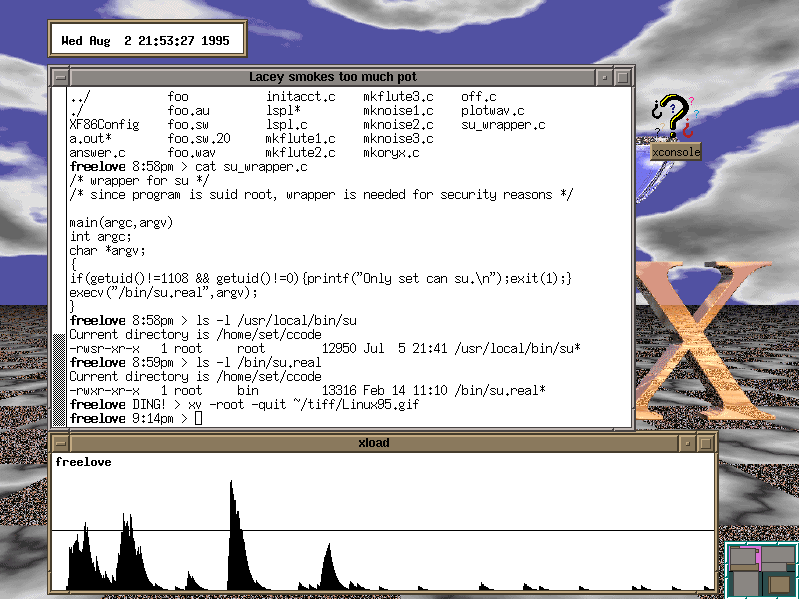
I have a tradition, dating back to 1995, of taking a screenshot of my Linux desktop at least once a year; I didn’t make one in 1997, but did make two in 1996, 2002, and 2007.

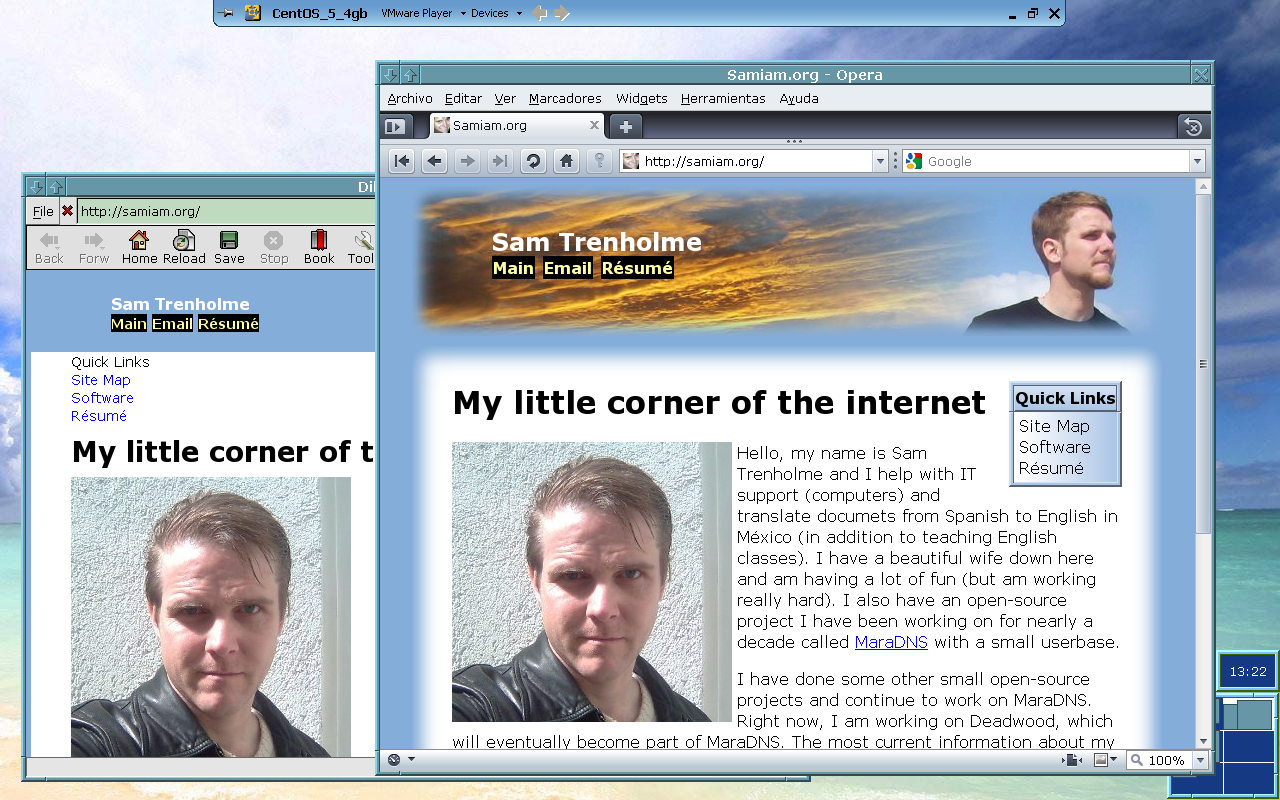
For the most part, I have been using FVWM1 for my Linux desktop; my 1995 screenshot shows FVWM1, as well as My most recent screenshot for 2010. Indeed, the only years where I’m not using FVWM1 for my desktop are 1996, 1999, 2001, 2002, 2003, and 2009 (but in 2009 FVWM1 is running on a virtual machine, and 2002 has two screenshots, one of which used FVWM1).

My web browser has also changed over the years; the 2000 screenshot shows me using Netscape 4; the 2002 screenshots show me using Mozilla and Konqueror; 2005-2009 screenshots show Firefox; and the 2010 screenshot uses Opera (note that I still use Firefox, but in Windows).

It’s an interesting look at my Linux desktop environment over the years. One thing is how font handling has improved over the years (note: The second 2007 and the 2008 screenshots show some experiments I did with font design); the wordprocessor in one of the 1996 screenshots as well as both 2002 screenshots show how ugly fonts used to look in Linux; for the 2010 screenshot I finally threw in the towel and use Verdana as my only proportional font, along with having full True Type delta hinting enabled. Another thing is how resolution has slowly been increasing over the years; my 1995-1998 screenshots show an 800x600 display with 256 colors; my 1999-2007 screenshots are 1024x768 with high (65536) color, and my most recent screenshots are 1280x800 with 24-bit true color.

Links to the screenshots along with, in some cases, descriptions and configuration files, are available here:

http://samiam.org/screenshots/

Friday, November 6, 2009

C-Evo 1.1.1 on one floppy

In my last blog entry, I noted a number of games that fit in under 7 megabytes. One of the games, C-Evo, I noted fitted in about 2.5 megabytes.

Actually, it fits on a single 1.44 meg floppy. Two if you want sound. What I have done is take the C-Evo installed files, remove the AI development kit (this is only useful if you're both a Delphi developer and have interest in developing an AI for C-Evo), and split off the sound. I then made two files; the core C-Evo game that is perfectly playable, albeit without sound, which compresses in to a 1,384,627 byte 7-zip file, and a file with all of the sounds for C-Evo, which compresses in to a 924,045 byte file.

If you need 7-zip to decompress C-Evo 1.1.1, that will also easily fit on a single floppy. Who needs CD-ROM drives anyway?

Speaking of floppies, the last version of Slackware that could be entirely installed from floppy was Slackware 3.4 from 1998; the last version of Slackware that could have the base system and networking utilities installed from floppy (installing the rest over the network) was Slackware 7.1 from 2002. A base Slackware 2.1 system (1994) fit on four floppies; the entire system only used 70 floppies. Yes, I remember, back in 1995, giving my roommate an entire floppy tray filled with 70 floppies so he could install Slackware on his computer. The base system for Slackware 7.1 needed 16 floppies; at that point it no longer made sense to use floppies any more.

Recently, an artist made artwork showing you would need hundreds of floppies to fit a modern Photoshop install. But, good software doesn't need that bloat. C-Evo shows that a compelling and addicting game can nicely fit on a single floppy; MaraDNS can also easily fit on a single floppy, complete with source code.

Zillions of Games can also easily fit on a single floppy; I have a version thats 400k in size that supports Chess and a couple of Chess variants (notably Capablanca chess). The majority of the space in the 20 meg install file for Zillions is for all of the graphics for all of the abstract games supported by Zillions.

Some other games that easily fit on a single floppy: Cultivation, Andy Noble's remakes of classic games

For people who want to look at the files showing C-Evo 1.1.1 on a floppy, go here:

http://www.samiam.org/cevo/

Thursday, October 15, 2009

Du for Windows and other tidbits

While MSYS offers the majority of the classic UNIX command line to Windows, one utility it does not have is du, which lets me see how much space a given directory takes up, and which files are hogging up hard disk space.

I have been using Cygwin to run “du”, but starting up a full *NIX environment (complete with X) to run that one command MSYS neglected to include is a little excessive.

While MSYS doesn’t have du, Microsoft has a free download of du for Windows. Its output is not quite the same output as the classic *NIX du, but it’s good enough for my purposes.

Another option I haven’t looked in to is the GNU coreutils for Windows, whose du output should be more UNIX-like.


In the early 1990s, people began to realize that floppy disks did not have enough space to store anything besides text documents and small images, so work began on making an affordable removable media with more space than a floppy disk.

One of the more successful attempts to do this was the Iomega Zip drive. Zip drives were quite common in the 1995-1999 timeframe, depending on your definition of “common”. They were common in the sense your average geek would have a zip drive, but not common in the sense that, when you bought a computer, it was a given it would have a zip drive. Zip drives were successful because you didn’t need a special connector to use them; you could attach it to the parallel port almost all PCs had in that time frame (or the SCSI Zip drive if you had a Macintosh or, in my case, used Linux before the Paraport driver was made). They were used a lot until compact disc recordables got affordable (hit the $1 per blank disk price point) around 1999 or 2000.

I used Zip drives and Zip disks for storing data offline from 1996 until early 2001, when my buddy Leo started letting me burn CDs on his CD burner.

There were competitors, such as the SyQuest EZ 135 Drive, the LS-120, and higher priced higher capacity options like the Jaz drive, the Orb Drive, the SparQ drive, among others. I actually got an Orb Drive and a few 2.2 gig cartridges for backing up the server we had at work back in the dot-com days.

Iomega still makes high-capacity removable drives and media. Their current technology is something called an REV drive, which uses 120 gigabyte cartridges (about $60 per cartridge). There’s another removable media technology called “RDX” with media up to 500 gigs in size (for $300). With this type of technology, you’re paying for convenience; a terabyte-size notebook hard disk is $127 at Pricewatch right now and a 100-pack of DVD-R (not +R, since -R stores seven more megabytes) media is around $25 at Meritline right now (you can store 500 gigs in 107 discs).

These days I use DVD-Rs to store data; my burner doesn’t support dial-layer blanks, so I just burn single-layer 4.7 gig disks for backups and what not.


My chess variant research continues. I have been doing a lot of computer simulations of various openings in my “Schoolbook” arrangement of the Capablanca pieces. White starts with a 7% advantage, so I’ve been looking for openings where Black can minimize that advantage. 1. e4 d5 2. exd5 Nb6 looks to equalize things for black, 1. f4 c5 appears to give black a strong advantage, and I’ve been spending over a week looking for Black’s best reply to 1. c4; right now 1. c4 Mh6 looks to be Black’s best reply, but I need to do more research on this.

Chess variants are one of those things where it’s trivial to “invent” a variant but difficult to research how to play the variant in question. There’s a reason a lot of strong chess players resist any attempt to change the rules of chess; people have spent centuries in to finding the best moves in chess, and any change, even one as simple as rearranging the pieces in the opening, throws out a lot of that study.

Wednesday, July 1, 2009

Memories of Usenet

Usenet is dead.

Usenet has been dead for a few years now.

Yeah, sure, there is this thing out there that works like The Pirate Bay using NNTP instead of BitTorrent packets, but that isn't the Usenet I knew and loved in the 1990s.

Usenet is dead.

Sure, you get a few crotchety oldtimers who get their panties in a bunch when you mention that Usenet is dead, just as you got people who denied the Amiga was dead for years and Japanese soldiers fighting World War II as recently as the 1970s. People often react to a loss or defeat with denial.

The last time I significantly used Usenet was back in the early 2000s. Before the college I was going to at the time set up Wi-Fi everywhere, allowing wireless internet access from my laptop, I would use Leafnode to download a number of Usenet newsgroups I would read during the day. I dialed up to my ISP (yes, I had dialup as recently as 2003), downloaded all the newsgroups I wanted to read, uploaded any posts I made while offline, and updated my local Usenet spool. I could then, over the day, read my daily set of new Usenet postings and post replies as appropriate.

I still kept this setup to read Usenet after they added Wi-Fi at school. I finally canceled my dial-up ISP, then did things in reverse: I would upload and download Usenet postings at school and read Usenet offline at home.

By then, alt.hackers, a fun little group about clever solutions to problems in the mid-1990s, was comatose and in its death throes. rec.audio.pro, a newsgroup discussing methods to record audio, was still alive and well, but would soon get replaced by Gearslutz. comp.os.linux.* was already overtaken by spam and flame wars; Linux users had taken their discussions to /., Kuro5hin, among other places.

By 2004, I realized that little worthwhile discussion was still taking place in Usenet, and moved on to web-based discussion boards. The way to be a part of a community on the internet changed in the 2000s; I had my first blog in 2003 (back then, it was called a "journal"), got a MySpace account (my first social networking account) in 2005 and started this blog in early 2007.

Usenet is dead.

I remember the day I discovered usenet. It was in the fall of 1993, and I was at the computer lab of a university I just transferred to. I was on a Macintosh and saw this icon marked "newsreader", opened it up, and discovered Usenet. It was incredible. I could use a computer to connect to this worldwide network of computers and talk with anyone in the world about any topic I wanted to talk about. It blew my mind away.

I soon learned UNIX and the TRN newsreader because I didn't have a computer at the time (this was when a basic computer would set you back $2000; these days a basic notebook or desktop is about $400) and wanted to be able to read and post to Usenet all night--the only computer labs open all night were running UNIX.

The skills I learned spending so much time reading Usenet translated in to me getting a job at Netcom, then one of the most prestigious internet providers, a couple of years later. I saw the internet experience an explosive growth in the late 1990s, with Mosaic and later Netscape giving the internet a user-friendly GUI, but still read and posted to Usenet using the TRN client on my computer running Linux.

In was around late 1997 that I first discovered a forum I liked that wasn't a Usenet forum, a place where men and women both talked about relationships, sex, and personal details about their life the way nobody in Usenet talked about their lives. I found the place wonderful, particularly since it had a lot of girls; something Usenet never really had.

I also was told by a co-worker about Slashdot, got a 4-digit account in 1998 and starting reading and posting there.

I continued to read Usenet for many things throughout the 1990s, but with the discovery of web-based forums in the late 1990s, my interest in Usenet started waning and the number of interesting discussions Usenet used to have (or never had) moved to the web. I had a friend who gave me access to Usenet II in 1998, a late-1990s attempt to revive the Usenet of the early 1990s, but that never went anywhere and was little more than a hierarchy of empty newsgroups; the only active group there talked about Usenet II and making sure Usenet II postings did not make it in to ordinary Usenet.

Usenet is dead.

The last really interesting thing to happen with Usenet was when Google was able to, in 2002, recover the majority of pre-1995 Usenet postings from archives individuals had. It was interesting to finally read entire legendary ancient Usenet threads, such as the legendary 1992 "Linux is obsolete" debate and see what people had to say about BIND and other DNS servers in the 1980s and early 1990s.

Usenet is dead.

It was fun while it lasted, but the internet has moved on and, in truth, Usenet really wasn't that great. There was no moderation, so no way to keep flame wars or spam under control. It was a place with a lot of arrogance and elitism; a place where experienced users took a sadistic delight in flaming newbies (this was even worse in IRC, the 1990s version of MSN and instant messaging); a place where finding an answer to a technical question was a hit-and-miss affair. A place without graphics or multimedia; the interface was nothing more than ugly fixed-width text on an 80-column screen.

But, it was the best we had at the time and I thank you for letting this aging geek talk about the way things used to be.

Usenet is dead.

It's time to move on. I have a lot of things today I didn't have when I was a Usenet junkie in the mid-1990s: A girlfriend who loves me and who I love; a community of real friends in the United States who I keep in touch with via Skype and social networking sites. I also have an open-source project I am eager to finish up.

I just looked at the code for Deadwood, and I haven't quite finished up the compression code. Things look good, however, and I just need to do a little more last-minute touchup before the compression code is done.